



If you would like to reset your WordPress User password, then you can use our built in tools. To reset your password:
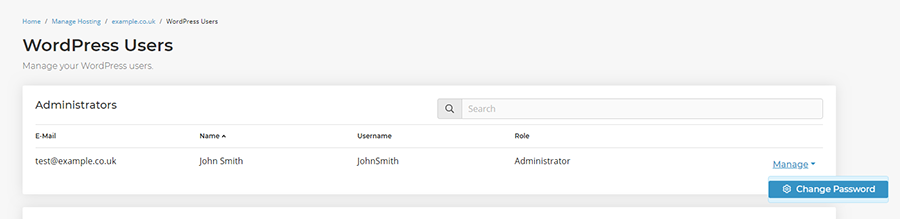
- Head to Manage Hosting-> [select package] -> Users.

- Find the user you'd like to reset the password for and select Manage -> Change Password.
- Enter the new password and select Change Password.
You can then log in using your new password.
Updating the password using phpMyAdmin
If you'd like to use the traditional method, or if your WordPress site is not on our WordPress platform then you can update WordPress user passwords directly from the database using phpMyAdmin:
- Head to Manage Hosting -> [select package] -> phpMyAdmin.
- Select Log In for the databse where the core WordPress installation is located.
- Select to expand the database tables on the left had side and locate the wp_users table.
- Locate the row with the user you wish to update the password for and select Edit.
- Locate the row with Column ID user_pass, select MD5 in the function dropdown and enter your new password in the Value field.
- Select Go and your password will now have updated.